> ## Documentation Index
> Fetch the complete documentation index at: https://docs.jadevelopment.co.uk/llms.txt
> Use this file to discover all available pages before exploring further.
# Settings
> Settings allow ShiftSync users to customise and enhance their experience. From disabling notification sounds to managing system access, everything you need is located in one place
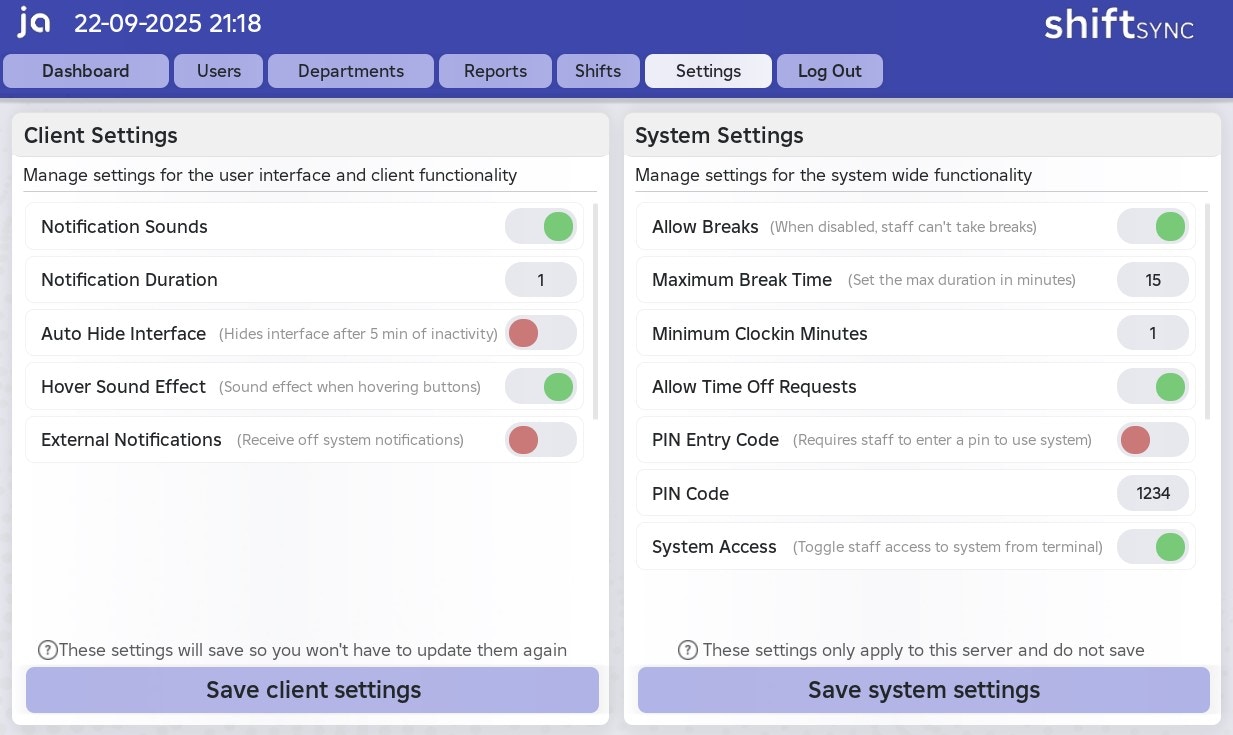 ## Client Settings
Client settings are saved, so any changes you make will persist without needing to be adjusted again.
When enabled, you will receive **sound effects** for notifications displayed to you.
You can customize the **notification duration**, allowing you to read them for longer if needed.
The minimum duration is `1` second, and the maximum is `10` seconds
When enabled, the interface (terminal) will automatically **zoom out** /hide after 5 minutes of inactivity.
When enabled, you will hear **sound effects** when hovering over elements of the UI.
You may not be able to hear the sound effects if you (the licence owner) do not own the sound effects. See the [installation instructions](https://docs.jadevelopment.co.uk/shiftsync/installation) for more details
When enabled, you will receive **off-system notifications**, such as alerts shown outside the main interface
* This feature is important for users who would like to be notified for certain events (e.g break ending, shift starting)
## Client Settings
Client settings are saved, so any changes you make will persist without needing to be adjusted again.
When enabled, you will receive **sound effects** for notifications displayed to you.
You can customize the **notification duration**, allowing you to read them for longer if needed.
The minimum duration is `1` second, and the maximum is `10` seconds
When enabled, the interface (terminal) will automatically **zoom out** /hide after 5 minutes of inactivity.
When enabled, you will hear **sound effects** when hovering over elements of the UI.
You may not be able to hear the sound effects if you (the licence owner) do not own the sound effects. See the [installation instructions](https://docs.jadevelopment.co.uk/shiftsync/installation) for more details
When enabled, you will receive **off-system notifications**, such as alerts shown outside the main interface
* This feature is important for users who would like to be notified for certain events (e.g break ending, shift starting)
 ## System Settings
Unlike client settings, system settings **do not save**. They are intended for in-game customization for various purposes without modifying studio configuration.
When enabled, users will be **unable to take breaks**.
Any users already on breaks when this setting is changed, will be taken off the break and notified
You can customise the **maximum break duration** in minutes.
The maximum break time must be at least `1` minute
You can customise the **minimum required minutes** for a clock-in.
When disabled, **time off requests** cannot be submitted by any user on the system.
When enabled, all users must enter a **4-digit PIN** set by administrators before accessing clock in/out functions.
You can customize the **4-digit PIN code** (e.g., `1234`).
When disabled, only **administrators** will have access to the system, and all staff will be **kicked off**, with the terminal disabled for them.
## System Settings
Unlike client settings, system settings **do not save**. They are intended for in-game customization for various purposes without modifying studio configuration.
When enabled, users will be **unable to take breaks**.
Any users already on breaks when this setting is changed, will be taken off the break and notified
You can customise the **maximum break duration** in minutes.
The maximum break time must be at least `1` minute
You can customise the **minimum required minutes** for a clock-in.
When disabled, **time off requests** cannot be submitted by any user on the system.
When enabled, all users must enter a **4-digit PIN** set by administrators before accessing clock in/out functions.
You can customize the **4-digit PIN code** (e.g., `1234`).
When disabled, only **administrators** will have access to the system, and all staff will be **kicked off**, with the terminal disabled for them.