> ## Documentation Index
> Fetch the complete documentation index at: https://docs.jadevelopment.co.uk/llms.txt
> Use this file to discover all available pages before exploring further.
# Home Page
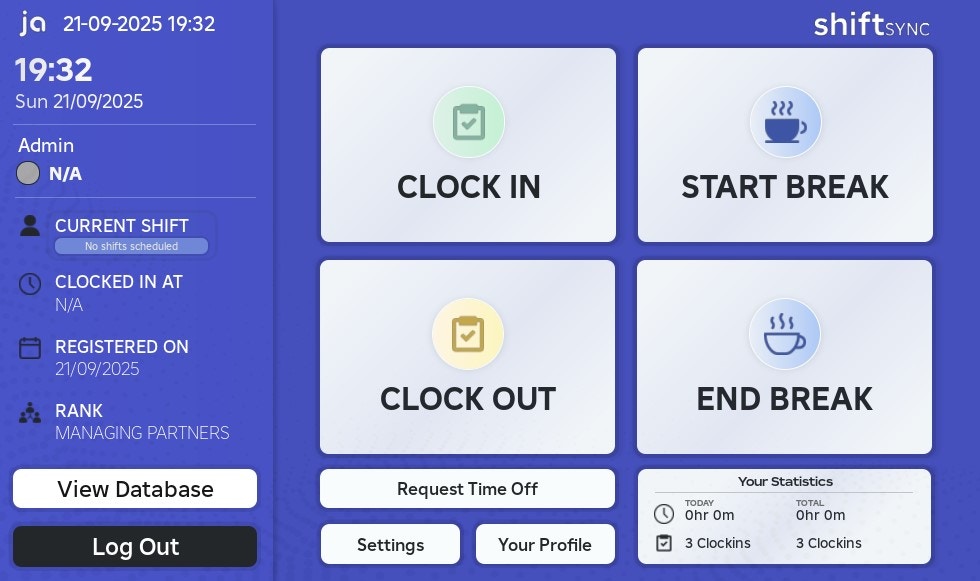
> Home page provides a central dashboard where you can access all areas of ShiftSync. You can clock in, take breaks, view your data, request time off, and manage your personal settings
On the home page, you can easily clock in, clock out and take breaks depending on the system settings
The **left sidebar** displays your **current shift**, and by clicking on it, you’ll see all of**your scheduled shifts**
You can also:
* Check your **clock-in status**, including when you clocked in and how long you’ve been active
* View your **registration date** with the system
* See your **group rank** associated with the system
The home page also includes a tab showing your \*\*total minutes \*\*(both for today and overall), along with the **number of clock-ins** for the day and in total