> ## Documentation Index
> Fetch the complete documentation index at: https://docs.jadevelopment.co.uk/llms.txt
> Use this file to discover all available pages before exploring further.
# Configuration
> Under the product folder provided, there will be Configuration script. Please open it to continue with this stage of the set up process
If you are struggling with configuration, please only contact support **after** you have checked each section. If you do not understand something, you are more than welcome to reach out, however **we'd prefer that you read the information provided first**.
**The following categories correlate, in order, to the configuration in the script provided.**
* Place your Roblox group ID, as the example shows below
```lua theme={null}
["Group Id"] = 14665139, -- Group ID allocated to system
```
* In your Roblox group, you will have roles which have their own ID. **Please add all of the role IDs** where those roles are specifically meant for staff
* All IDs must be placed inside of the , **followed by a comma for each of them**, as shown
```lua theme={null}
["Staff Ids"] = {1, 2, 250},
```
* **Please do the same for roles that are intended to have the administrator** privileges in the system. Administrators can manage all of the data, and access the dashboard
```lua theme={null}
["Admin Ids"] = {254, 255},
```
* Please create a random string of **letters and numbes for your data key**. This data key stores shifts, departments, time-off requests and clock-in data
**An example is shown below:**
```lua theme={null}
["Data Key"] = "MyShiftSync-Data",
```
* Please repeat the same for the following other data keys:
```lua theme={null}
["Player Data Key"] = "MyShiftSync-Players",
["Shifts Data Key"] = "MyShiftSync-Shifts",
```
When you change these data keys, **it will reset all of your data**, so please keep that in mind
* You can enable `Vision Names`, which will fetch version `v.1.7` roleplay names. These names will be displayed on some areas of the system
Vision Names will **only work when you have it in your game**
```lua theme={null}
["Vision Names"] = true,
```
* You can add a webhook straight from your Discord server, and we'll pick up any events and send them straight to the webhook that belongs to the channel!
Learn more about [**discord webhooks**](https://support.discord.com/hc/en-us/articles/228383668-Intro-to-Webhooks), and how to set them up
```lua theme={null}
["Webhook URL"] = "",
```
* `Interaction` is the type of interaction that takes place for users
* We have two options for interactions, `ProximityPrompt` (a popup asking you to hold E) or `ClickDetector` (click on the fingerprint sensor)
```lua theme={null}
["Interaction"] = "ClickDetector",
```
* You must also **set the maximum distance** required to interact with the terminal
* The lower the number, the closer you must be to interact
```lua theme={null}
["Maximum Distance"] = 5,
```
* We offer one theme, which is the beloved **Blurple**. We intend to add many more in the future, which you will be able to change to those by editing the configuraton element
* If you enter anything incorrect, it will just default to **Blurple**.
```lua theme={null}
["UI Theme"] = "Blurple",
```
* The zoom time is the amount of seconds it takes for your camera to zoom in/out of the terminal
```lua theme={null}
["Zoom Time"] = 0.5,
```
* You have the option to require terminal users to enter a PIN number when first accessing the system
* To enable this, change `false` to `true`
* To edit the PIN number, replace the `"1234"` with anything of your choosing, for example `"0491"`
```lua theme={null}
["Requires PIN"] = {Enabled = false, PIN = "1234"},
```
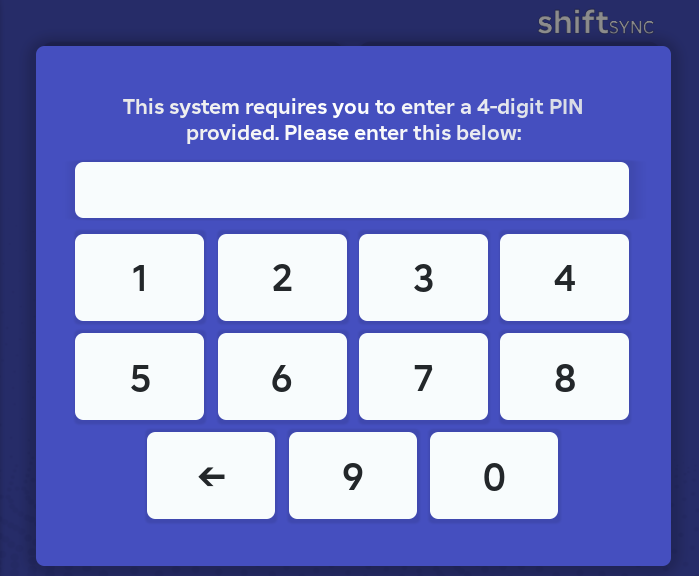 * You can also enable `External Notifications` - which display messages to users if they are not currently interacting with the system
* This feature is important for users who would like to be notified for certain events (e.g break ending, shift starting)
* You can also enable `External Notifications` - which display messages to users if they are not currently interacting with the system
* This feature is important for users who would like to be notified for certain events (e.g break ending, shift starting)
 ## Boot Delay
* Some intensive or "laggy" games may struggle with loading times, causing ShiftSync to be tempremental upon booting
* To mitigate this, we've added a `Boot Delay`, which waits that many seconds before the system it initalised
* By default, this is set to `0`, as the system usually loads without issues
```lua theme={null}
["Boot Delay"] = 0,
```
## Breaks and Clocking Out
* You are able to **toggle the ability for users to take breaks**
* To disable breaks, change `true` to `false`
```lua theme={null}
["Breaks Allowed"] = true,
```
You can also **disable or enable this in-game** using the system settings panel in Settings
* You can set the **minimum number of minutes** for a break to be classified as a break within the system
* This is required to be at least `1` by default
* For example, you could set this to 5, and it would require users to wait 5 minutes before the break can be ended
```lua theme={null}
["Minimum Break Time"] = 1,
```
* You can set the **maximum number of minutes** a break can be
* Once a break has reached the maximum, it will automatically end, and will notify the user
```lua theme={null}
["Maximum Break Time"] = 3,
```
* You can set the **minimum minutes** required before clocking out
## Core Settings
* You are able to **change the timezone** for the system based on any of the options below
BST - British Summer Time
GMT - Greenwich Mean Time
EET - Eastern European Time
CET - Central European Time
ET - Eastern Time
EST - Eastern Standard Time
CT - Central Time
AEST - Australian Eastern Standard Time
AEDT - Australian Eastern Daylight Time
```lua theme={null}
["Timezone"] = "BST",
```
* You can **toggle the dashboard**, which removes the ability to view staff information, departments, shifts and reports
* All users would only be able to access the main functions: clock in, clock out, start/end breaks
* To disable this, change `true` to `false`
```lua theme={null}
["Dashboard Enabled"] = true,
```
* You can toggle **debug mode**, which allows us (developers) and support team to identify any issues you are facing
* You may be advised to enable this if you find yourself in need of support
* It is recommended to leave this disabled (as `false`) by default
```lua theme={null}
["Debug Mode"] = false,
```
* You can choose how often the **system data is periodically saved**
* We recommend leaving this at 300 seconds (5 minutes)
**Data will automatically save every 5 minutes**, and will save when the server shuts down
```lua theme={null}
["Save Data"] = 300,
```
* You can customise the **cooldown**, which prevents users from interacting with core functions (home page buttons), and notification popups
* This is required to be at least `1` by default
```lua theme={null}
["Cooldown"] = 3,
```
## Shifts
* You can customise the **minimum shift length** (in minutes), which is how long a shift must be when creating it
* This must be at least `1` minute by default
* For example, `Minimum Shift Length` is `60`, which means a shift must be at **least 60 minutes**, otherwise it cannot be created
```lua theme={null}
["Minimum Shift Length"] = 1,
```
* You can customise the **maximum shift length** (in minutes), which is the maximum duration of a shift
* This must be at least `1` minute by default
* For example, `Maximum Shift Length` is `120`, which means a shift **cannot be more than** 120 minutes
```lua theme={null}
["Maximum Shift Length"] = 540,
```
**The default maximum shift length is 9 hours**
## Miscellaneous
* You can **toggle the ability for users to be able to request time off**
* To disable time off requests, change `true` to `false`
```lua theme={null}
["Allow Timeoff Request"] = true,
```
* You can set the **number of days in which a time off request start date must be within**
* For example, set the `Approval Window Days` to `7`, means that any time off requests must start within 7 days
```lua theme={null}
["Approval Window Days"] = 7,
```
* You can set the **minimum number of days required for a time off** request
* By default, this is required to be at least `1` day
* For example, if you set minimum days off to `14`, it would mean users must have time off for at least 14 days
```lua theme={null}
["Minimum Days Off"] = 1,
```
* You can set the **maximum number of days available for a time off** request
* The overall maximum is `365` days (`1 year` )
* For example, if you set the maximum number of days to `60`, it will allow users to **have their end date reach 60 days ahead of the current date**, therefore *offering a maximum of 60 days off*
```lua theme={null}
["Maximum Time Off Days"] = 30,
```
* You can toggle **description required** for when **users create time off** requests
* When disabled, users are **not** required to add a description for time off
* To disable this, change `true` to `false`
```lua theme={null}
["Description Required"] = true,
```
* You can customise the reasons for requesting time off
* The maximum number of reasons off is `5`
**The following options are provided by default:**
```lua theme={null}
["Timeoff Types"] = {
"Personal Leave",
"Training Leave",
"Holiday Leave",
"Relocation Leave",
"Other Leave",
}
```
To edit one of the above, just replace the contents within the `" "` \
For example, if I want to change `"Other Leave"` to `"General Leave"`
```lua theme={null}
["Timeoff Types"] = {
"Personal Leave",
"Training Leave",
"Holiday Leave",
"Relocation Leave",
"General Leave", -- I have edited this one
}
```
## Boot Delay
* Some intensive or "laggy" games may struggle with loading times, causing ShiftSync to be tempremental upon booting
* To mitigate this, we've added a `Boot Delay`, which waits that many seconds before the system it initalised
* By default, this is set to `0`, as the system usually loads without issues
```lua theme={null}
["Boot Delay"] = 0,
```
## Breaks and Clocking Out
* You are able to **toggle the ability for users to take breaks**
* To disable breaks, change `true` to `false`
```lua theme={null}
["Breaks Allowed"] = true,
```
You can also **disable or enable this in-game** using the system settings panel in Settings
* You can set the **minimum number of minutes** for a break to be classified as a break within the system
* This is required to be at least `1` by default
* For example, you could set this to 5, and it would require users to wait 5 minutes before the break can be ended
```lua theme={null}
["Minimum Break Time"] = 1,
```
* You can set the **maximum number of minutes** a break can be
* Once a break has reached the maximum, it will automatically end, and will notify the user
```lua theme={null}
["Maximum Break Time"] = 3,
```
* You can set the **minimum minutes** required before clocking out
## Core Settings
* You are able to **change the timezone** for the system based on any of the options below
BST - British Summer Time
GMT - Greenwich Mean Time
EET - Eastern European Time
CET - Central European Time
ET - Eastern Time
EST - Eastern Standard Time
CT - Central Time
AEST - Australian Eastern Standard Time
AEDT - Australian Eastern Daylight Time
```lua theme={null}
["Timezone"] = "BST",
```
* You can **toggle the dashboard**, which removes the ability to view staff information, departments, shifts and reports
* All users would only be able to access the main functions: clock in, clock out, start/end breaks
* To disable this, change `true` to `false`
```lua theme={null}
["Dashboard Enabled"] = true,
```
* You can toggle **debug mode**, which allows us (developers) and support team to identify any issues you are facing
* You may be advised to enable this if you find yourself in need of support
* It is recommended to leave this disabled (as `false`) by default
```lua theme={null}
["Debug Mode"] = false,
```
* You can choose how often the **system data is periodically saved**
* We recommend leaving this at 300 seconds (5 minutes)
**Data will automatically save every 5 minutes**, and will save when the server shuts down
```lua theme={null}
["Save Data"] = 300,
```
* You can customise the **cooldown**, which prevents users from interacting with core functions (home page buttons), and notification popups
* This is required to be at least `1` by default
```lua theme={null}
["Cooldown"] = 3,
```
## Shifts
* You can customise the **minimum shift length** (in minutes), which is how long a shift must be when creating it
* This must be at least `1` minute by default
* For example, `Minimum Shift Length` is `60`, which means a shift must be at **least 60 minutes**, otherwise it cannot be created
```lua theme={null}
["Minimum Shift Length"] = 1,
```
* You can customise the **maximum shift length** (in minutes), which is the maximum duration of a shift
* This must be at least `1` minute by default
* For example, `Maximum Shift Length` is `120`, which means a shift **cannot be more than** 120 minutes
```lua theme={null}
["Maximum Shift Length"] = 540,
```
**The default maximum shift length is 9 hours**
## Miscellaneous
* You can **toggle the ability for users to be able to request time off**
* To disable time off requests, change `true` to `false`
```lua theme={null}
["Allow Timeoff Request"] = true,
```
* You can set the **number of days in which a time off request start date must be within**
* For example, set the `Approval Window Days` to `7`, means that any time off requests must start within 7 days
```lua theme={null}
["Approval Window Days"] = 7,
```
* You can set the **minimum number of days required for a time off** request
* By default, this is required to be at least `1` day
* For example, if you set minimum days off to `14`, it would mean users must have time off for at least 14 days
```lua theme={null}
["Minimum Days Off"] = 1,
```
* You can set the **maximum number of days available for a time off** request
* The overall maximum is `365` days (`1 year` )
* For example, if you set the maximum number of days to `60`, it will allow users to **have their end date reach 60 days ahead of the current date**, therefore *offering a maximum of 60 days off*
```lua theme={null}
["Maximum Time Off Days"] = 30,
```
* You can toggle **description required** for when **users create time off** requests
* When disabled, users are **not** required to add a description for time off
* To disable this, change `true` to `false`
```lua theme={null}
["Description Required"] = true,
```
* You can customise the reasons for requesting time off
* The maximum number of reasons off is `5`
**The following options are provided by default:**
```lua theme={null}
["Timeoff Types"] = {
"Personal Leave",
"Training Leave",
"Holiday Leave",
"Relocation Leave",
"Other Leave",
}
```
To edit one of the above, just replace the contents within the `" "` \
For example, if I want to change `"Other Leave"` to `"General Leave"`
```lua theme={null}
["Timeoff Types"] = {
"Personal Leave",
"Training Leave",
"Holiday Leave",
"Relocation Leave",
"General Leave", -- I have edited this one
}
```